The short answer
In our Meta Ads experience, Bid Cap has delivered our best results in the campaigns where we used it. It sets a limit on the bid Meta can enter in an auction. It is not a cap on total spend or cost per result. A cap that is too restrictive can reduce delivery, so any comparison needs to consider outcomes as well as price.
What does Bid Cap actually control?
Bid Cap is the manual bid strategy in Meta Ads Manager. The amount limits what Meta can bid in an individual auction for the result the ad set is optimized to get. That is different from a cost per result goal, which aims for an average result cost, and from highest volume, which seeks the most results for the budget without your own bid ceiling.
The number in the Bid Cap field should be interpreted in the context of the ad set's optimization goal. It does not guarantee a particular cost per conversion or that the full budget will be spent.
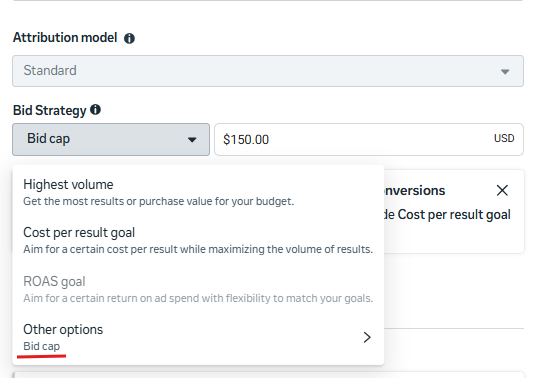
Why do we keep coming back to it?
In the campaigns where we have used it, Bid Cap has produced our best results. That observation is why we think this setting deserves a closer look. We have not published a matched comparison or the campaign metrics behind the result, so we cannot claim a specific lift or isolate the bid setting as the only cause.
It is easy to overlook because it is tucked away in the interface. We would not call it a universal winner: the same constraint that can help avoid expensive auctions can also exclude valuable opportunities. Our results are an account-specific observation, not a benchmark for every advertiser.
We are sharing the observation rather than a claimed lift percentage. The screenshot documents the setting, but it does not contain performance data or a comparison against another strategy. When reading results across tools, our Meta Ads and GA4 reconciliation guide offers a way to check what each number measures.
How to evaluate Bid Cap without fooling yourself
- Define the result first. Decide whether the campaign is about qualified traffic, leads, sales, or another measurable outcome. Set a clear measure of success.
- Start from account economics. Use recent performance and the maximum sustainable cost for the optimized result to choose a test cap. A value copied from another account or screenshot has no useful meaning.
- Compare like with like. Keep the creative, audience, placements, objective, and measurement window as consistent as possible when comparing Bid Cap with another bid strategy.
- Read delivery and quality together. Watch spend, result volume, cost per result, and the quality of the outcome that matters to the business.
- Revisit the cap. If spend or result volume falls sharply, the limit may be too restrictive. If delivery rises but customer economics deteriorate, a higher bid is not automatically better.
Meta's advertiser guidance also warns that a bid set too low can impair delivery and learning. That makes underdelivery part of the test result, not a technicality to ignore.
Frequently asked questions
Is Bid Cap the same as Cost per Result Goal?
No. Bid Cap limits what Meta can bid in each auction. Cost per Result Goal aims to keep the average cost near a target. Neither setting guarantees a particular final cost.
Does Bid Cap guarantee a lower cost per result?
No. It can restrict which auctions are available, but delivery and the quality of results can change. We compare the business outcome and the amount of usable volume, not just the bid setting.
Is the $150 in the screenshot a starting point?
No. It is the amount visible in this interface example. A sensible cap depends on the campaign's optimization goal, economics, and recent account data.
Sources and scope
This article describes InnerJoinData's qualitative experience and uses our Ads Manager screenshot to show the setting. The screenshot is not evidence of performance. Meta's campaign setup guidance discusses bid settings and the delivery risk of a bid set too low. This is a qualitative account; we have not published campaign-level figures or a controlled lift estimate.